Working with CAIA
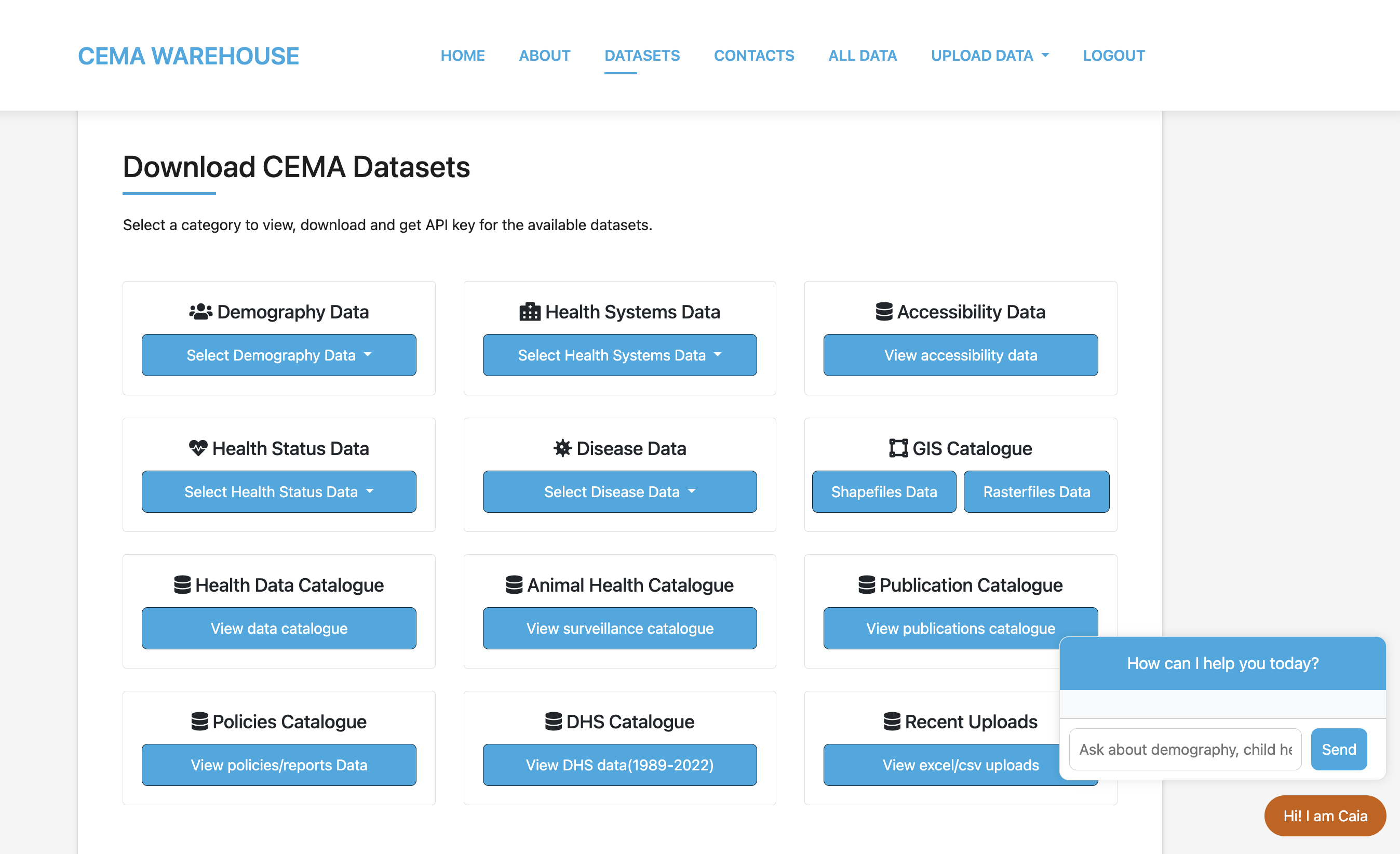
CAIA (CEMA AI Assistant) is a smart search tool that helps you find the right data in the warehouse quickly. Think of it as your research assistant that understands what kind of health data you're looking for and points you to the most relevant datasets.
What CAIA Does
CAIA is not an AI chatbot that answers complex questions or analyzes data for you yet. Instead, it's an intelligent keyword-based query search tool that:
- Finds matching datasets when you give a keyword describing what you aare searching for
- Suggests related data to the keyword you provided
- Provides direct API links to download or access the data
- Searches across all categories in the warehouse simultaneously
How CAIA Works
Step 1: Keyword Matching
When you type a search like "maternal health", CAIA looks through:
- Table names in the database
- Category names (like "Health Systems", "Demography", "Health Status")
- Subcategory names (like "Maternal health ", "Demography")
Step 2: Smart Suggestions
Based on your search terms, CAIA finds:
- Direct matches - tables that contain your exact keyword
- Related categories - broader tables that might contain relevant data
Step 3: Organized Results
CAIA presents results in priority order:
- Exact table matches first - datasets that directly match your search
- Category suggestions - broader areas to explore for related datasets
- API links - direct access to download the data

How to Use CAIA Effectively
Use Simple, Clear Terms
Good searches:
- "birth"
- "workforce"
- "malaria"
- "population"
- "child"
- "workforce"
Less effective searches:
- "I need data about mothers and babies in rural areas"
- "Can you help me find information on disease patterns?"
- "Hello my name is Anne, I need data on vaccination coverage and child mortalities"
Understanding CAIA Results
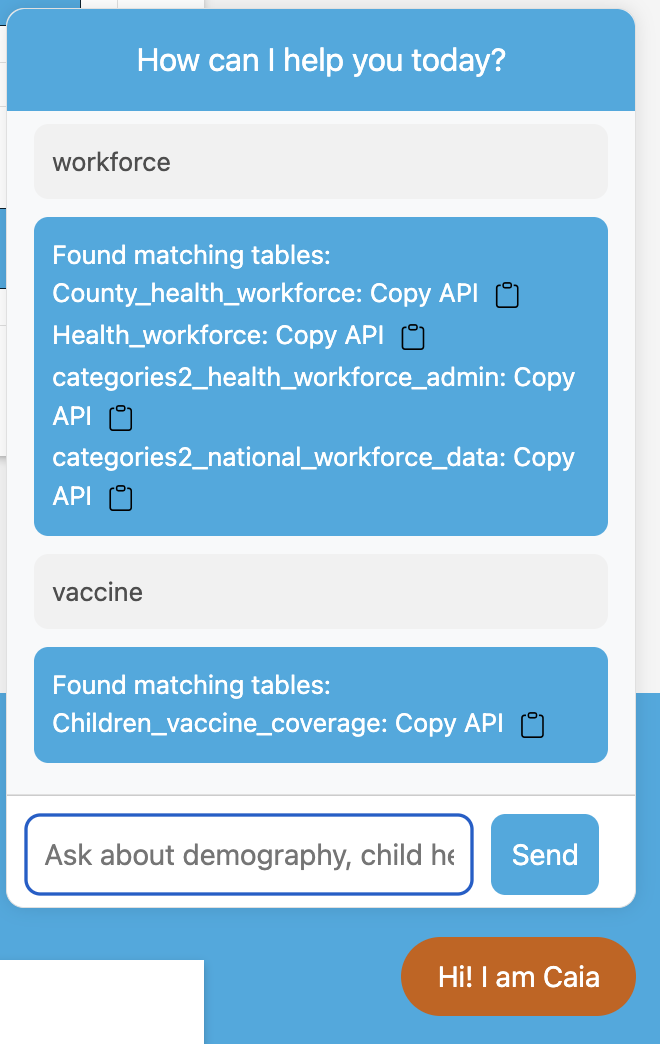
Table Matches
When CAIA finds exact table matches, you'll see:
Found matching tables:
County_health_workforce: Copy API [📋]
Health_workforce: Copy API [📋]
Children_vaccine_coverage: Copy API [📋]
- Table name - the actual dataset name
- Copy API button - click to copy the direct download link
- Limited display - shows first 5 matches to avoid overwhelming you and the server
Working with API Links
When you click Copy API next to a result, you get a direct link like:
Using the Links
- In your browser - Paste the link to download CSV data directly
- In R - Use
fread("paste-link-here")orread_csv("paste-link-here") - In Python - Use
pd.read_csv("paste-link-here")
Limitations to Keep in Mind
What CAIA Cannot Do
- Answer analytical questions - It finds data but doesn't analyze it
- Provide interpretations - You need to analyze the data yourself
- Handle complex queries - Keep searches simple and focused since she is a keyword based query tool
- Access restricted data - Only shows publicly available datasets unless user is logged in
When to Use Other Methods
- Browse categories directly if you want to see all available data in a topic
- Use the main search if you know exact table names or have an idea of a keyword for the data you are trying to access
- Use the ALL DATA tab to access all tables in the database. Must be authenticated to access this section.
If You Get No Results
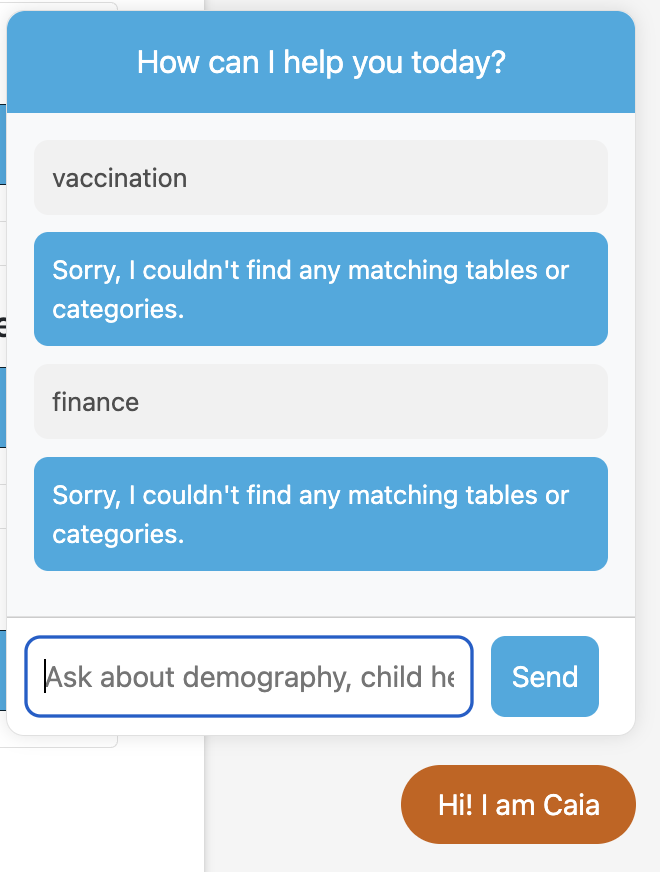
- Browse categories manually - The data might be there under a different name
- Use the ALL DATA tab to access all tables in the database. Users must be authenticated to access this section.
The Future of CAIA
She’s still growing — not yet powered by full natural language understanding — but the vision is clear: to transform her into a true data assistant, powered by natural language processing (NLP) with models like BERT(Bidirectional Encoder Representations from Transformers) capable of understanding human language and returning dynamic insights in real time. We are not there yet, but the foundation is laid.
Need help? Contact or consult the documentation sections for detailed guidance on specific tasks.