Category-Specific Upload Guide
This is a step-by-step guide for uploading different types of health data to the warehouse. Each category has specific requirements to ensure the data is properly organised and available to researchers.
Demography Data
Demographic data provides data on population and its demographics.
What to upload
- Population statistics - total population, age groups, gender distribution
- Birth and death registration - vital statistics, registration rates
- Migration patterns - internal movement, urbanization trends
- Household characteristics - family size, composition, socioeconomic status
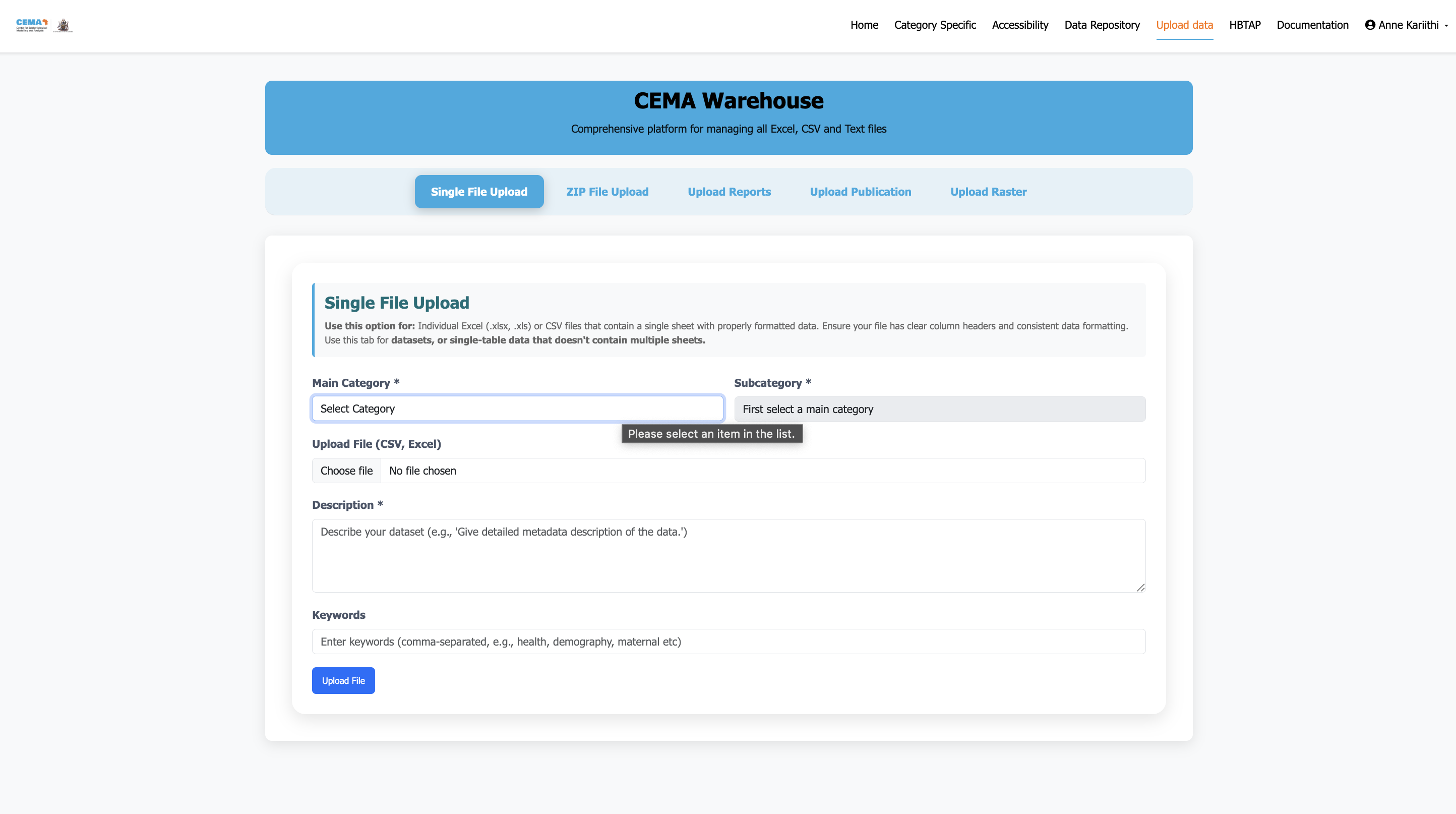
Upload process for demographic data
Key Requirements
- Navigate to the admin upload interface
- Select the category the data belongs to: currently we only have Demography
- Add an accurate description of the data you are uploading including the years the data was recorded, what it represents, the source of the data etc.
- Include age breakdowns when possible (0-5, 5-14, 15-49, 50+ years) if the data provides this
- Separate male/female data for gender-specific analysis
- Geographic specificity - county, sub-county, or ward level
- Data source documentation - census, survey, administrative records
Health Systems Data
Health systems data includes information about healthcare infrastructure, workforce , and service delivery across Kenya.
What to Upload
- Quality of care services - antenatal care, newborn care , emergency care etc
- Health workforce information - doctors, nurses, community health workers
- Service delivery statistics - outpatient visits, admissions, procedures
- Health systems financing - expenditure, health spending projections
Step-by-Step Upload Process
Step 1: Access Upload Interface
- Navigate to upload health systems data from the main menu (You must be authenticated to access this page)
- Select Health Systems tab from the upload modal
- Choose your specific subcategory (e.g., "Health Workforce", "Quality of care", "Financing, or " Service delivery)
File Format Requirements:
- Excel files (.xlsx, .xls) - Most common and preferred
- CSV files (.csv) - Good for large datasets
Data Structure Guidelines:
- First row should contain headers - Clear, descriptive column names
- One record per row - Each facility, health worker, etc. on separate row
- Consistent data format - Same format within each column
- Include geographic identifiers - County, sub-county, ward when applicable
Required Information:
- Dataset Title - Clear, descriptive name, this will be automatically mapped to the name of the uploaded files.
- Description - What the data contains, source, collection methods
- Time Period - When the data was collected (e.g., "January 2023")
- Geographic Coverage - Which areas are covered
- Contact Information - Who to contact about this data (this is useful incase someone else wants to understand the data better or needs clarification)
Health Status
Health status data includes information on disease burden, maternal and child health across Kenya.
The upload process is described below:
What to Upload
- Maternal health - antenatal care, maternal health
- Child health - child mortalities, lifetables, neonatal care , under five mortality, vaccination copverage
Step-by-Step Upload Process
Step 1: Access Upload Interface
- Navigate to upload health status data from the main menu (You must be authenticated to access this page)
- Select Health Status tab from the upload modal
- Choose your specific subcategory (e.g., "Child health", "Maternal Health")
File Format Requirements:
- Excel files (.xlsx, .xls) - Most common and preferred
- CSV files (.csv) - Good for large datasets
Data Structure Guidelines:
- First row should contain headers - Clear, descriptive column names
- One record per row - Each facility, health worker, etc. on separate row
- Consistent data format - Same format within each column
- Include geographic identifiers - County, sub-county, ward when applicable
Required Information:
- Dataset Title - Clear, descriptive name, this will be automatically mapped to the name of the uploaded files.
- Description - What the data contains, source, collection methods
- Time Period - When the data was collected (e.g., "January 2023")
- Geographic Coverage - Which areas are covered
- Contact Information - Who to contact about this data (this is useful incase someone else wants to understand the data better or needs clarification)
Accessibility
Health status data includes information on geographic access, roads, distance calculations to medical facilities across Kenya.
The upload process is the same as described in the above categories, except you will hav eto navigate to the accessibility tab and select the relevant sub-category you want to implement the upload.
Step-by-Step Upload Process
Step 1: Access Upload Interface
- Navigate to upload accessibility data from the main menu (You must be authenticated to access this page)
- Select Accessibility tab from the upload modal
- Choose your specific subcategory (e.g., "ENT services", "ICU services", "Comprehensive maternal care services")
File Format Requirements:
- Excel files (.xlsx, .xls) - Most common and preferred
- CSV files (.csv) - Good for large datasets
Data Structure Guidelines:
- First row should contain headers - Clear, descriptive column names
- One record per row - Each facility, health worker, etc. on separate row
- Consistent data format - Same format within each column
- Include geographic identifiers - County, sub-county, ward when applicable
Required Information:
- Dataset Title - Clear, descriptive name, this will be automatically mapped to the name of the uploaded files.
- Description - What the data contains, source, collection methods
- Time Period - When the data was collected (e.g., "January 2023")
- Geographic Coverage - Which areas are covered
- Contact Information - Who to contact about this data (this is useful incase someone else wants to understand the data better or needs clarification)
Common Upload Issues and Solutions
Problem: "File format not supported"
Solution:
- Convert to .xlsx or .csv format
- Ensure file is not corrupted
- Check file extension matches actual format
- Ensure the file name is well written no spaces. For example animal_population.csv not animal population.csv
Data Quality Issues
Problem: "Missing required columns"
Solution:
- First row should contain headers
- Include geographic identifiers (County, Sub-county)
- Ensure all mandatory fields are populated
- Should not have images inside the files otherwise, zip and upload as a zipped file
- Should contain only one worksheet. For data with multiple worksheets, zip and upload as a zipped file.
Need help? Contact or consult the documentation sections for detailed guidance on specific tasks.